
Two Boxes, One Fuse – Teaching the WARP Charger to Read the Victron Grid Meter
The WARP Charger has a ready-made Victron preset. It is good enough for solar surplus charging, but blind to exactly the numbers dynamic load management needs. Here is how to talk to the grid meter directly.

My burrow has one main fuse and a growing list of things that want to eat from it. The heat pump, the MultiPlus-II charging the battery, the kitchen, and – the hungriest of them all – the wallbox. A WARP Charger can pull 11 kW without breaking a sweat, and when it does so while the Molewife bakes a cake and the heat pump defrosts, the fuse starts looking at me in a way I do not like.
The cure is called dynamic load management (DLM): the wallbox watches the grid connection and throttles itself before any phase exceeds what the fuse can take. To do that, it needs a meter at the grid connection. I already have one – a three-phase Carlo Gavazzi meter hanging off my Victron Cerbo GX. And the WARP firmware even ships a Victron preset. Plug and play, right?
Of course not. Otherwise this would be a tweet, not a blog post.
The Stack
| Component | What it does here |
|---|---|
| Tinkerforge WARP Charger | Wallbox, meter type Modbus/TCP |
| Victron Cerbo GX | Modbus TCP server for the whole Victron system |
| MultiPlus-II + battery | The rest of the Victron installation |
| Carlo Gavazzi three-phase meter | Grid meter, connected to the Cerbo |
What the WARP needs from a grid meter, according to its documentation:
- PV surplus charging: active power (import minus export), sum over L1–L3, in W
- Dynamic load management: current per phase L1, L2, L3, in A
Keep that second line in mind. It is the whole plot.
Step 0: Wake Up the Modbus Server on the GX
On the Cerbo, enable Settings → Integrations → Modbus TCP server. Below the switch, under Available services, the GX tells you which Modbus unit ID belongs to which D-Bus service. In my installation:
| Unit ID | Service |
|---|---|
| 100 | System (com.victronenergy.system) |
| 30 | Grid meter (com.victronenergy.grid) |
The 100 is fixed. The 30 is not – it depends on the device instance of the meter on your GX. Look it up on your own box rather than copying mine.
Way 1: The Ready-Made "Victron Energy GX" Preset
The WARP offers a register table called Victron Energy GX. Port 502, device address 100, virtual meter Grid – done in thirty seconds, and the meter view lights up with the grid power per phase.
Then you switch on dynamic load management, and nothing useful happens.
A quick look into the WARP firmware source explains why. The preset reads the system summary on unit 100, registers 820–822: grid power per phase. That is it. No phase currents. And phase currents are precisely what the DLM needs. With the preset, PV surplus charging works fine; load management is flying blind.
The slightly annoying part: VRM happily shows the phase currents. The Victron system knows them. They are just not in the system service – they live one level deeper, in the grid meter's own service.
Way 2: A Custom Register Table, Straight to the Meter
So I skip the system summary and ask the meter service directly.
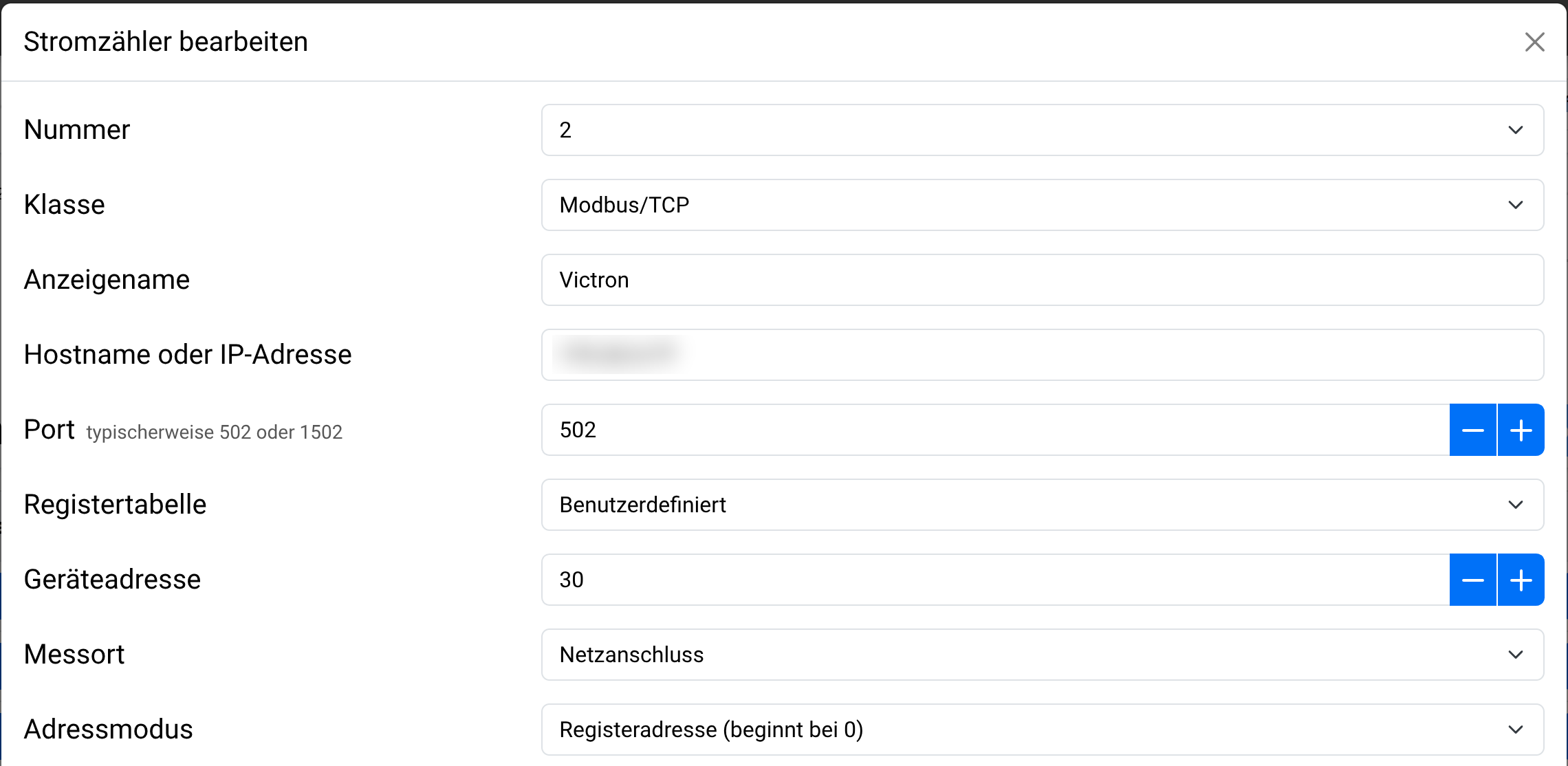
Meter Settings
| Field | Value |
|---|---|
| Class | Modbus/TCP |
| Host | IP of the Cerbo GX |
| Port | 502 |
| Register table | Custom (Benutzerdefiniert) |
| Device address | Unit ID of the grid meter (30 here) |
| Location | Grid connection |
| Address mode | Register address (starts at 0) |
Registers
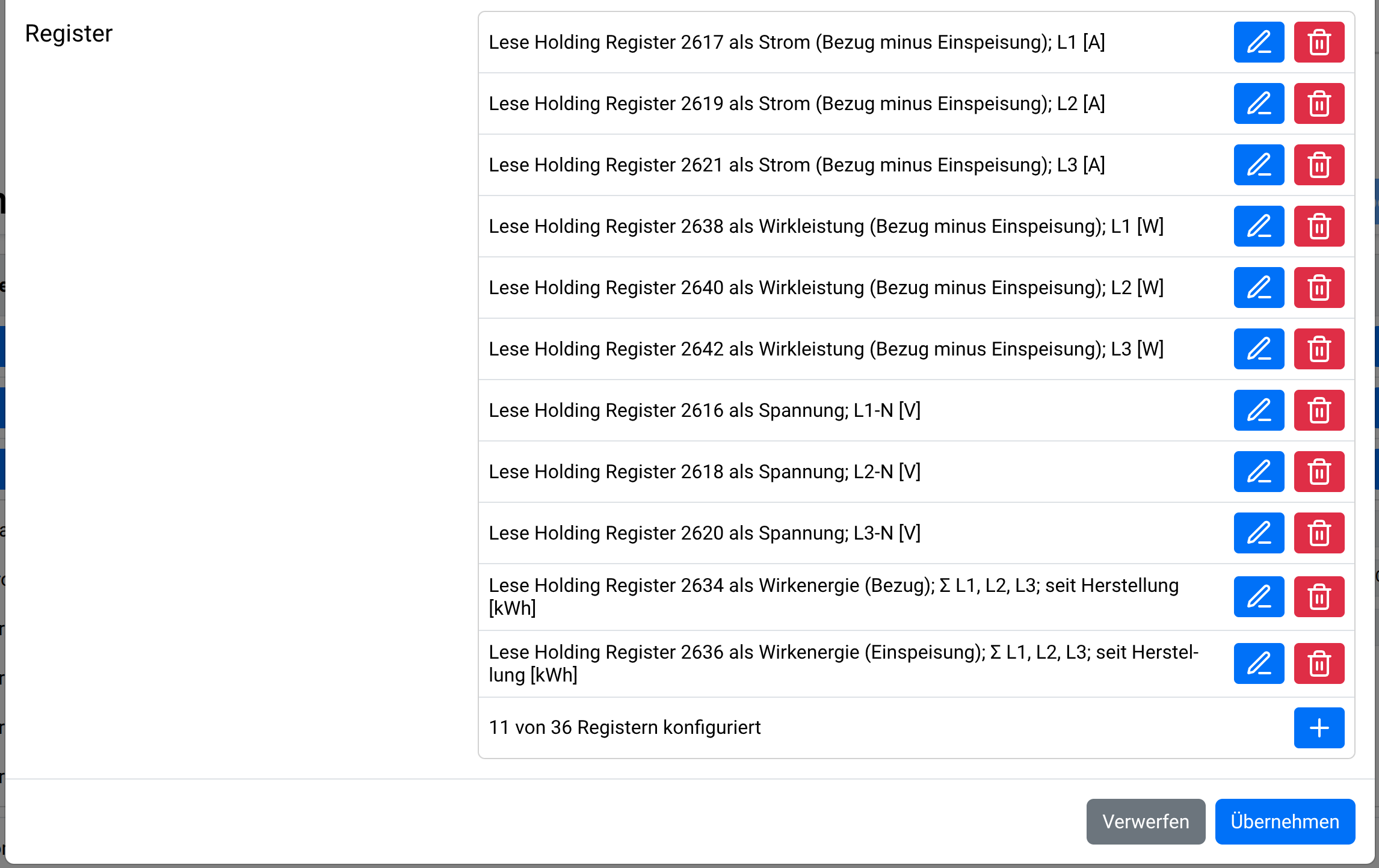
All of them are holding registers (function code 3). The Cerbo answers function code 4 identically, so it does not matter much – but holding registers is what the Victron register list says.
| Address | Type | Scale | WARP value ID |
|---|---|---|---|
| 2617 | S16 | 0.1 | Current L1 (import minus export) |
| 2619 | S16 | 0.1 | Current L2 (import minus export) |
| 2621 | S16 | 0.1 | Current L3 (import minus export) |
| 2638 | S32BE | 1 | Active power L1 (import minus export) |
| 2640 | S32BE | 1 | Active power L2 (import minus export) |
| 2642 | S32BE | 1 | Active power L3 (import minus export) |
| 2616 / 2618 / 2620 | U16 | 0.1 | Voltage L1-N / L2-N / L3-N (optional) |
| 2634 | U32BE | 0.01 | Active energy import, Σ (optional) |
| 2636 | U32BE | 0.01 | Active energy export, Σ (optional) |
A few notes from the excavation:
- The total power is free. You do not need a register for "active power Σ L1, L2, L3". The WARP adds up the three phases itself – 2,670 + 1,421 + 208 W = 4,299 W in the screenshot below. That sum is exactly what PV surplus charging consumes.
- S16 or S32? Registers 2600–2602 contain the same per-phase power as S16. That caps out at ±32.7 kW per phase, which is plenty for a burrow, but the S32 variant at 2638 ff. costs nothing extra and never overflows.
- There is room. The WARP allows 36 registers per custom meter. I use eleven.
The firmware computes each value as (raw + offset) × scale (source), so the scale column is where most mistakes happen. Which brings me to …
Pitfalls I Fell Into (So You Don't Have To)
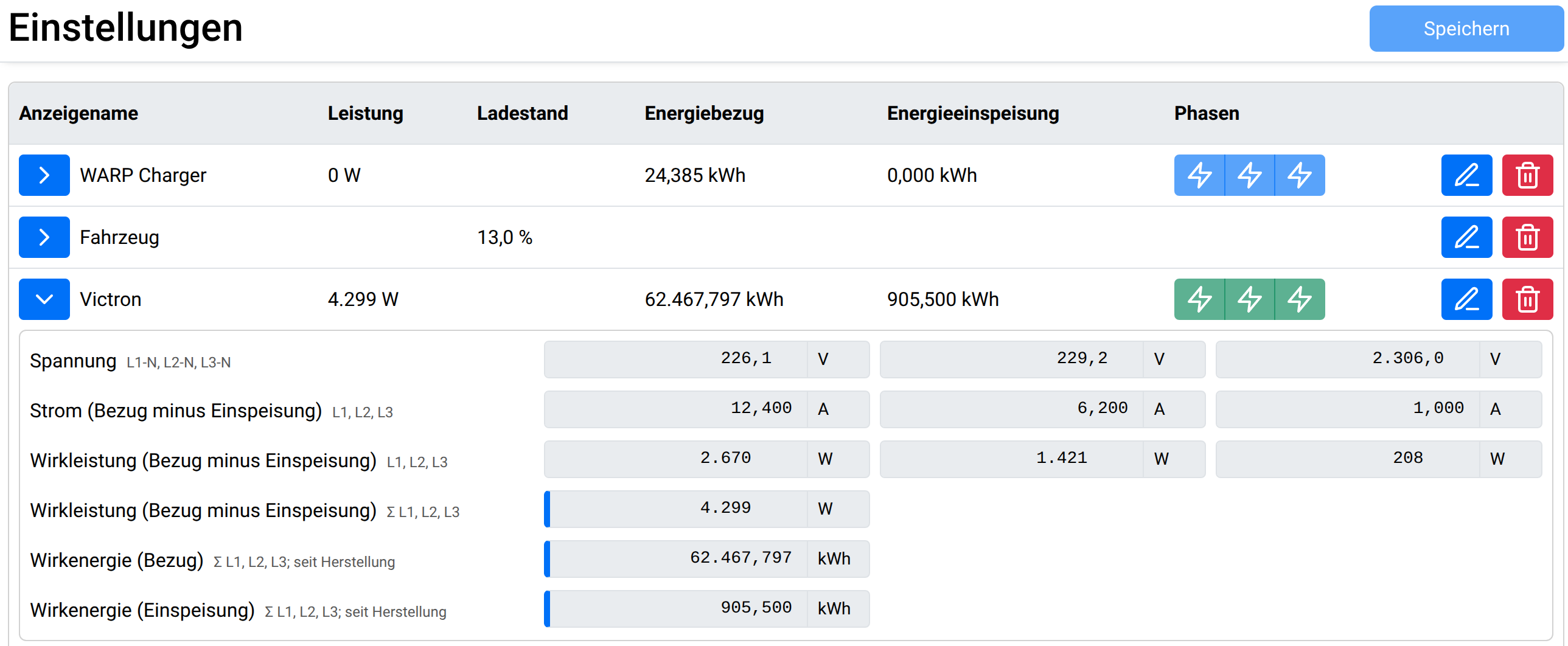
One wrong scale factor. Look at the voltage of L3 in the screenshot: 2,306.0 V. My house would have noticed. The Cerbo reported 232.3 V at the same moment – I simply entered scale 1 instead of 0.1 for register 2620. The voltage is optional and not used by the DLM, but the same typo on a current register would make load management either panic or sleep. Check every single line.
0-based or 1-based addresses. With the address mode register address (starts at 0), the addresses from Victron's list fit 1:1. The live values confirm it: 226.1 V / 229.2 V on L1/L2 and 12.4 / 6.2 / 1.0 A currents are sane numbers. With the other mode (register number), you would presumably have to add one everywhere. Quick sanity test: register 2616 must show roughly 230 V. If it shows something like 12 or 2670, you are off by one.
The sign of the currents. During my test, all three phases were importing, so all currents were positive. Whether the meter reports negative currents when a phase exports is something I still have to verify on a sunny day. If they stay positive, choose the value ID current (import) instead of import minus export – otherwise the WARP will believe a phase pushing power into the grid is drawing from it, which errs on the safe side but wastes headroom.
Unit IDs are not forever. The meter's unit ID follows its device instance on the GX. Rewire or re-add devices on the Cerbo, and the 30 may become something else. After any surgery on the GX, check Available services again.
Cross-Checking with Raw Modbus
Before trusting a web form, I like to ask the device myself. This little script needs nothing but the Python standard library:
import socket, struct

GX_HOST = "192.168.1.10"  # IP of your Cerbo GX


def rd(fc, unit, addr, n):
    s = socket.create_connection((GX_HOST, 502), timeout=3)
    s.send(struct.pack(">HHHBBHH", 1, 0, 6, unit, fc, addr, n))
    r = s.recv(512)
    s.close()
    if r[7] & 0x80:
        return "EXC %d" % r[8]
    return struct.unpack(">%dH" % n, r[9:9 + 2 * n])


s16 = lambda v: v - 65536 if v > 32767 else v

for fc in (3, 4):
    v = rd(fc, 30, 2600, 3)
    print("FC", fc, "P", v if isinstance(v, str) else [s16(x) for x in v])

v = rd(3, 30, 2616, 6)
print("U/I", [(x / 10 if i % 2 == 0 else s16(x) / 10) for i, x in enumerate(v)])

v = rd(3, 30, 2638, 6)
print("P32", [struct.unpack(">i", struct.pack(">HH", v[i], v[i + 1]))[0] for i in (0, 2, 4)])

v = rd(3, 30, 2634, 4)
print("E imp/exp kWh", [(v[i] << 16 | v[i + 1]) / 100 for i in (0, 2)])

v = rd(3, 100, 820, 3)
print("System 820-822", [s16(x) for x in v])
At the time of my test:
| L1 | L2 | L3 | |
|---|---|---|---|
| Voltage | 226.9 V | 230.8 V | 232.3 V |
| Current | 12.0 A | 6.3 A | 0.8 A |
| Power | 2581 W | 1431 W | 141 W |
The system registers 820–822 on unit 100 showed the same power values at the same time. So the preset and the custom table agree on what they both know – the custom table just knows more.
Switching On Load Management
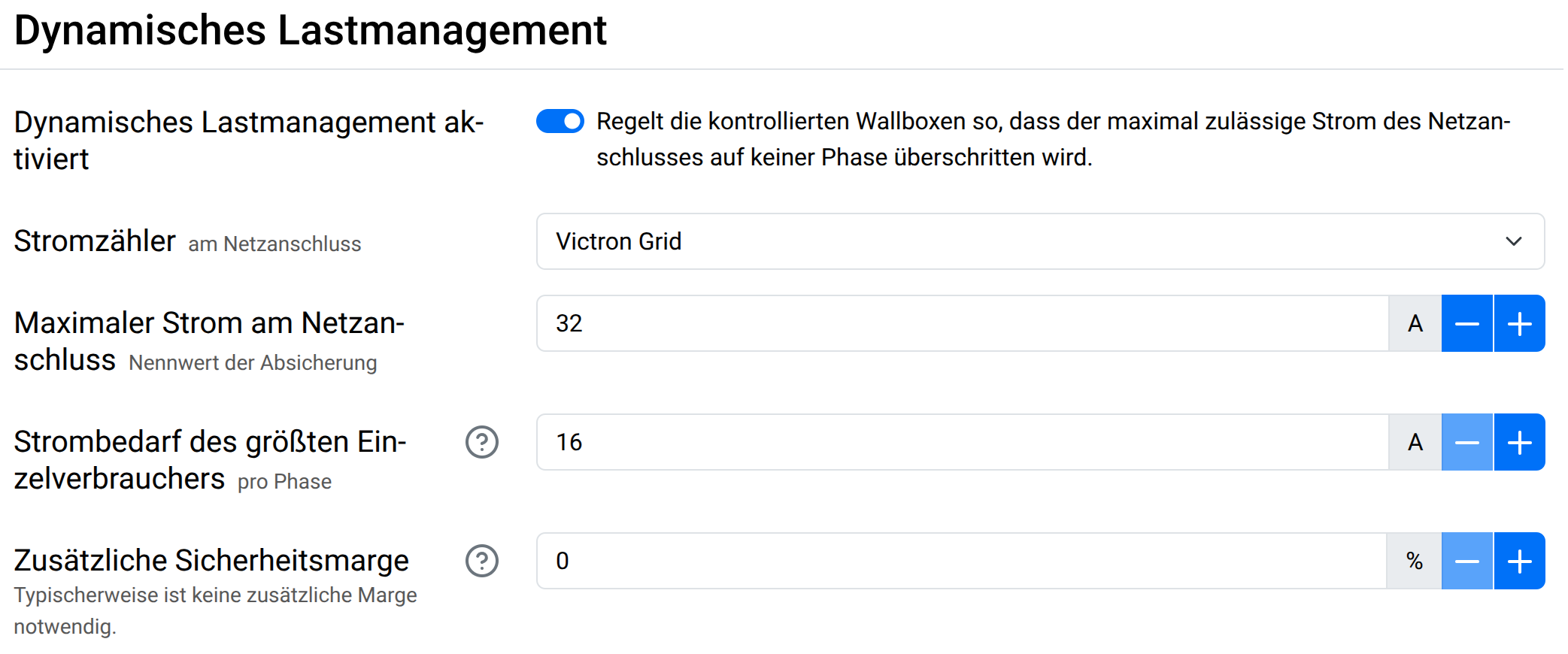
With the currents available, the DLM finally has something to work with. Under Energy management → Dynamic load management:
| Field | My value |
|---|---|
| Dynamic load management | on |
| Meter at grid connection | the custom Victron meter |
| Maximum current at grid connection | 32 A (rating of the main fuse) |
| Current of the largest single consumer | 16 A per phase |
| Additional safety margin | 0 % |
The WARP then regulates all controlled wallboxes so that the permitted current of the grid connection is not exceeded on any phase. That "any phase" is the reason the per-phase currents are mandatory – a sum of power cannot tell you that L1 is at 30 A while L3 idles.
One trap here: make sure the selected meter really is the new custom one. If an old meter based on the preset is still around and selected, the DLM happily runs without currents. Delete the old one once the new one works.
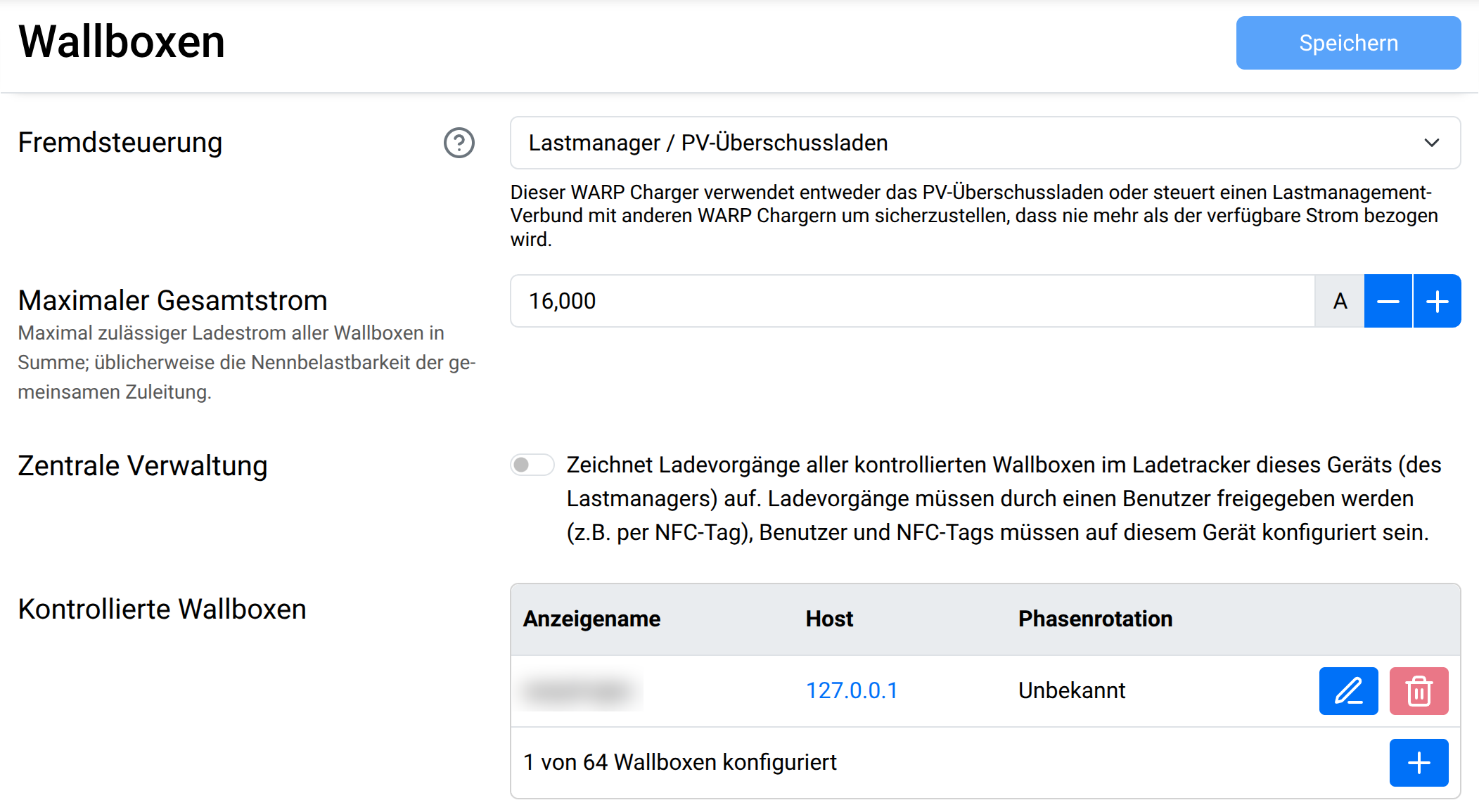
The second trap cost me an embarrassing amount of tunnel time: flipping the DLM switch is not enough. The WARP also has to be told that it is in charge of a wallbox – even if that wallbox is just itself. Under Wallboxes (Wallboxen), set External control (Fremdsteuerung) to Load manager / PV surplus charging (Lastmanager / PV-Überschussladen), enter the Maximum total current (Maximaler Gesamtstrom) that all controlled wallboxes together may draw, and add the charger to Controlled wallboxes (Kontrollierte Wallboxen) with host 127.0.0.1 – yes, the box controls itself via loopback, which is about as introspective as hardware gets. I set the total current to 16 A: I only have one charger, and it is capped at 11 kW anyway (16 A × 3 phases × 230 V ≈ 11 kW), so promising it more would be wishful thinking. Protecting the 32 A main fuse stays the DLM's job.
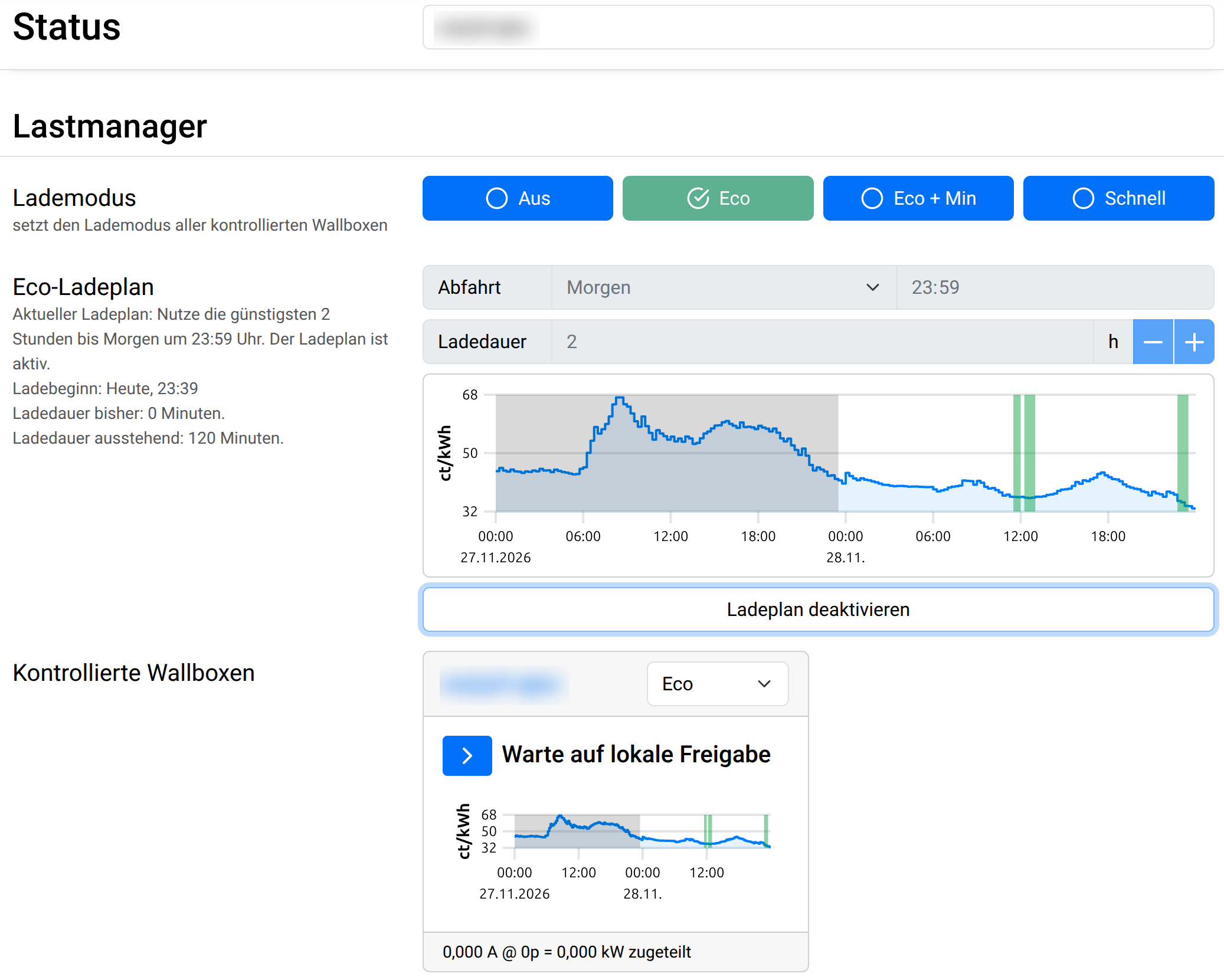
Without this, load management simply stays locked, and the status screen never shows the charge planning. With it, a whole Load manager (Lastmanager) block appears on the status page: charge modes Off / Eco / Eco + Min / Fast, and an Eco charge plan (Eco-Ladeplan) that picks the cheapest hours before a departure time based on the day-ahead electricity price. Eco is exactly what I was after. What Eco + Min and Fast do in detail is still on my to-dig list – I'll report back once I've excavated that.
Detour: Netted or Not?
While digging through the energy registers, I stumbled over a question every German PV owner eventually asks. A German bidirectional utility meter nets across phases: if L1 exports 1 kW while L3 imports 1 kW, it counts zero. Does the Victron side do the same?
It does not. Via the Cerbo, there are only per-phase counters, and the "total" registers are just their sum:
| L1 | L2 | L3 | Sum of phases | Total register | |
|---|---|---|---|---|---|
| Import (kWh) | 42,636.9 | 7,553.6 | 12,274.7 | 62,465.2 | 62,468.1 (2634) |
| Export (kWh) | 778.2 | 121.1 | 6.1 | 905.4 | 905.5 (2636) |
If the total were netted, it would be noticeably lower than the phase sum – especially on the export side, where L1 does almost all the exporting. The few kWh of difference come from the registers not being sampled at the same instant. Unit 100 (system) has no energy counters at all; the "from grid / to grid" values in VRM are computed by Victron from power readings. And the energy registers only count in 0.01 kWh steps.
import socket, struct

GX_HOST = "192.168.1.10"  # IP of your Cerbo GX

s = socket.create_connection((GX_HOST, 502), timeout=3)
s.send(struct.pack(">HHHBBHH", 1, 0, 6, 30, 3, 2622, 16))
r = s.recv(512)
s.close()

v = struct.unpack(">16H", r[9:41])
u = [(v[i] << 16 | v[i + 1]) / 100 for i in range(0, 16, 2)]
imp, exp = u[0:3], u[3:6]
print("Import per phase", imp, "sum", round(sum(imp), 2), "| 2634 total", u[6])
print("Export per phase", exp, "sum", round(sum(exp), 2), "| 2636 total", u[7])
print("Balance phase sums", round(sum(imp) - sum(exp), 2), "| balance totals", round(u[6] - u[7], 2))
What follows from that:
- For the wallbox, it does not matter. PV surplus and DLM both work with power and current, not with meter readings.
- If you want a netted meter reading, integrate the netted total power yourself – in Home Assistant, a Riemann sum integral split into a positive (import) and a negative (export) part does the job.
- Some Carlo Gavazzi models have their own netted counter or a switchable measurement mode. The Cerbo does not pass that through, though; you would have to read the meter directly via RS485.
What's Next
The open items on my list: watch the current signs on a sunny day, and see how the DLM behaves when the wallbox, the heat pump and the battery charger all want their share at once. If the fuse stays quiet and the Molewife's cake comes out of the oven on time, I'll call it a success.
And to whoever at Tinkerforge reads this: a second Victron preset that points at the grid meter service would save the next mole an evening of register archaeology.
Sources
- WARP docs – compatible devices (Victron section)
- WARP docs – meter value requirements for PV surplus and DLM
- WARP docs – energy meters in the web interface
- WARP firmware – Victron preset
- WARP firmware – custom register table
- hass-victron – Home Assistant integration whose register map for
com.victronenergy.gridI used as a starting point, cross-checked live on my Cerbo - Victron's official CCGX Modbus-TCP register list (Excel, on victronenergy.com)